
MGTEK Help Producer 4
Create HTML help systems from Microsoft Word documents
- One-click help system generation
- Seamless integration in Microsoft Word
- Powerful customization and scripting features
- Create Browser Help files compatible with any browser
- Create CHM help files for Windows applications
- Create Microsoft Help 2.0 for Visual Studio .NET
Introducing MGTEK Help Producer
Help Producer is a document conversion tool for that allows you to create professional HTML help systems from a Microsoft Word document.
Help Producer is seamlessly integrated into the user interface of Microsoft Word, which makes authoring a help file as easy as writing a regular Word document. With a click on a button, Help Producer will analyze your Word document and generate all files necessary to build a help file, such as project files, table of contents files, index files, HTML topic files, and graphics.
Help Producer can take advantage of many of Microsoft Word's existing editing and formatting features, including colors, fonts, styles, lists, tables, embedded pictures or objects, and even auto-shapes. In addition to the ability to leverage off the authoring features offered by Microsoft Word, Help Producer has many innovative and exciting features that will help technical writers create professional help files.
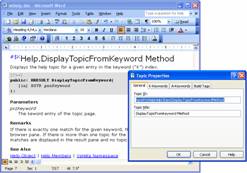
Work inside Microsoft Word
With Help Producer, authoring HTML Help files could not get any easier. By extending the powerful authoring environment of Microsoft Word, Help Producer lets you create help files from your existing Word documents. Unlike other help authoring tools, Help Producer does not include its own help topic editor; instead, it lets you edit your help topics directly in Microsoft Word, which enables you to leverage your existing skill set and content.
Increase Your Productivity
One of the design goals of Help Producer was to use most of the built-in features of Microsoft Word, and to make the tool as little intrusive to the normal process of writing documents as possible. Help Producer accomplishes this goal by taking advantage of many of Word's existing editing and formatting features, without abusing certain features for the sake of authoring help files. This enables the technical writer to focus on writing the help document, instead of dealing with the technologies behind HTML Help.
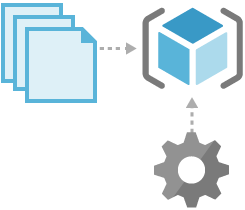
Automatically generate help projects
Help Producer fully automates the process of converting your Word documents to HTML help files. With a click on a button of the Help Producer toolbar, Help Producer generates all files necessary to create a compiled help file, such as HTML and graphics files, project files, table of contents files, and index files. No further editing of the generated files is required. All output formats can be generated from the same document by simply changing the output format.
Create Microsoft HTML Help 1.0 help files
Help Producer has full support for HTML Help 1.0 (.chm) help files, the default help system for Microsoft Windows. Help Producer's project editor allows you to use all features found in HTML Help 1.0, such as table of contents, index, search, windows, etc. Further, Help Producer supports advanced features such as A-links, context ID mapping, etc.
Create Microsoft Help 2.0 help files
Microsoft Help 2.0 is Microsoft's new help system used exclusively in Visual Studio .NET. If you are creating tools or components for .NET, Microsoft Help 2.0 is the preferred help system if you want to integrate your product with Visual Studio .NET. Help Producer is the first and only help authoring tool that fully supports the MSDN20 template, as specified the Visual Studio Help Integration Kit, which allows you to create help files with the exact same appearance as those in the MSDN Library.
Create MGTEK Browser Help
In addition to compiled HTML Help you can create MGTEK Browser Help, a platform independent help system that can be viewed in any major browser. MGTEK Browser Help is optimized to provide fast loading pages, even when viewed across a low-bandwidth internet connection. With a typical initial load time of less than 0.2 seconds using a slow DSL connection, regardless of the number of pages in your help file, MGTEK Browser Help is one of the fastest browser help systems on the market.
Fully customizable
Help Producer introduces the concept of HTML templates and themes. HTML templates offer simple but powerful customization of HTML files similar to Active Server Pages (ASP). A theme is a set of templates, scripts, and resource files that enables you to fully control the look of the produced HTML output. With the Theme SDK, you can create themes yourself and customize them to fit your needs, to ensure a consistent appearance of you help files throughout your corporation.
Multi-language support
Help Producer is fully Unicode enabled, which allows you to write help files in almost any language, including script or symbol languages such as Japanese, or Chinese, and right-to-left languages such as Arabic. To take full advantage of Help Producer's Unicode capabilities, you need a Unicode enabled operation system such as Windows XP or higher. Best of all, Help Producer is capable of generating localized HTML Help 1.0 files without the need for a localized operating system.
COM Scripting Object Model
Help Producer is entirely based on Microsoft's COM Object Model architecture. The object model that Help Producer exposes contains over 100 COM objects, which can be accessed by any scripting language, such as JScript or VBScript. The scripting object model is also used to script templates and themes, which allows you to fully control the generated output. In addition, you can automate Help Producer to perform complex tasks, for instance a batch conversion of Word documents.
System Requirements
Supported operating systems
- Windows 10 (32-bit and 64-bit)
- Windows 8 (32-bit and 64-bit)
- Windows 7 (32-bit and 64-bit)
- Windows Vista (32-bit)
- Windows XP SP2 or higher (32-bit)
Additional requirements
- Microsoft Word 2000 to Microsoft Word 2016 (32-bit only)
Ready to increase your productivity?
If you would like to try Help Producer, we are pleased to provide you with a free evaluation version:
helpproducer.exe, V4.0.4326
Trial Software Limitations
- 30-days time limit
- Limit of up to 100 topic pages
- Evaluation notice in each topic page